Download and Install the Authorware WebPlayer Plugin.


Set your monitor resolution to 800 x 600.

Revisit this page and click on the link below. Wait for the course to load and away you go.

Click one of the choices of training below.
Microsoft Word for Kids
This online version of the course parallels the face to face version. It was created with Macromedia Authorware and can be accessed via a web browser with the Authorware WebPlayer Plug-in installed.
To access the online version you must:
|
Download and Install the Authorware WebPlayer Plugin.
|
|
Set your monitor resolution to 800 x 600. |
|
Revisit this page and click on the link below. Wait for the course to load and away you go. |
|
Click one of the choices of training below. |
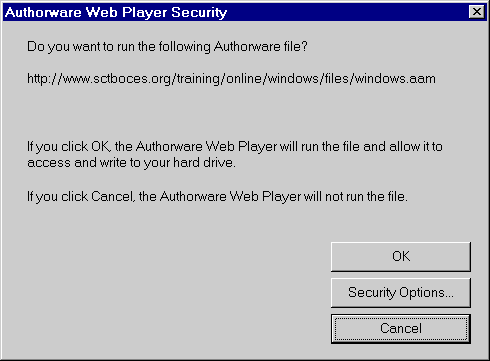
Note: The first time you run the course a security dialog box may appear. Click on OK and the course will work properly.


Beginner Covered Skills Advanced Covered Skills
|
The Standard Toolbar The Formatting Toolbar Moving A Toolbar Viewing A Toolbar Toolbars Available in Word Getting Help Creating a New Document Moving Around A Document Viewing Format Characters Saving A Document Retrieving A Document Closing A Document Undo/Redo Inserting Text Deleting Text Replacing Text Without Deleting Moving Text Copying Text to A New Document Spelling and Grammar Check Spelling and Grammar Quick Check
Margins
Printing a document Print Preview |
Changing Font Size/Style Boldfacing, Italicizing, or Underlining Before Typing Boldfacing, Italicizing, or Underlining After Typing Line Spacing Bullets and Numbering Borders and Shading
Inserting A Graphic From t he Clip Art Gallery Inserting A Graphic From A Source Other Than The Clip Art Gallery Moving A Graphic Sizing A Graphic Inserting WordArt |
The Standard Toolbar The Formatting Toolbar Moving A Toolbar Viewing A Toolbar Toolbars Available in Word What's Your Mouse Telling You? Getting Help Creating a New Document Moving Around A Document Viewing Format Characters Saving A Document Retrieving A Document Closing A Document Two Common Layout Views Zooming In and Out Switching Between Documents Undo/Redo Selecting Text With The Mouse Deselecting Text Inserting Text Deleting Text Replacing Text Without Deleting Moving Text Copying Text to Another Location Copying Text to A New Document Spelling and Grammar Check Spelling and Grammar Quick Check Using The Thesaurus |
Printing a document Changing Font Size/Style |